Private duty home care
Run your home care agency on CareSign.
Shifts, caregiver task lists, the weekly ADL form your clients sign, long-term care insurance packets, payroll, and private-pay invoices, with proof that every shift happened. Built for the way a private duty agency already runs.
The workflow in under two minutes
Private duty. Every shift in view.
Caregiver schedules, mobile shift instructions, approved care tasks, weekly ADLs, client signatures, service oversight, and office review. See the private duty workflow in CareSign.
1:56 · Music and on-screen captions. Real product screens with synthetic demo data from this agency type. Portrait views show the CareSign iOS app.
Schedule the care
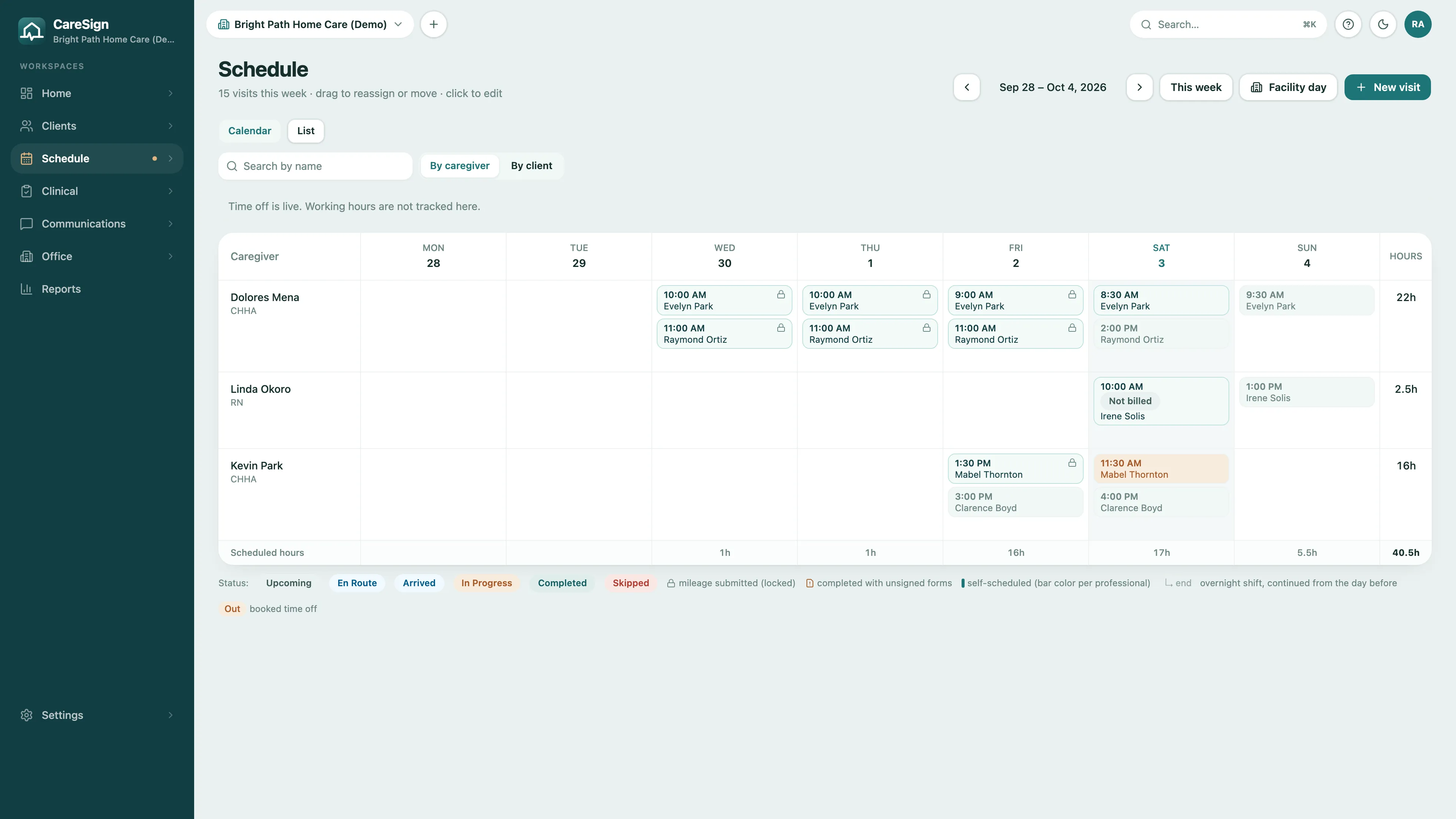
Client shifts, caregiver assignments, and scheduled hours, with weekly ADL status in the iPhone app.
Keep the plan close
Approved client care tasks for grooming, meals, mobility, and companionship.
Follow the week
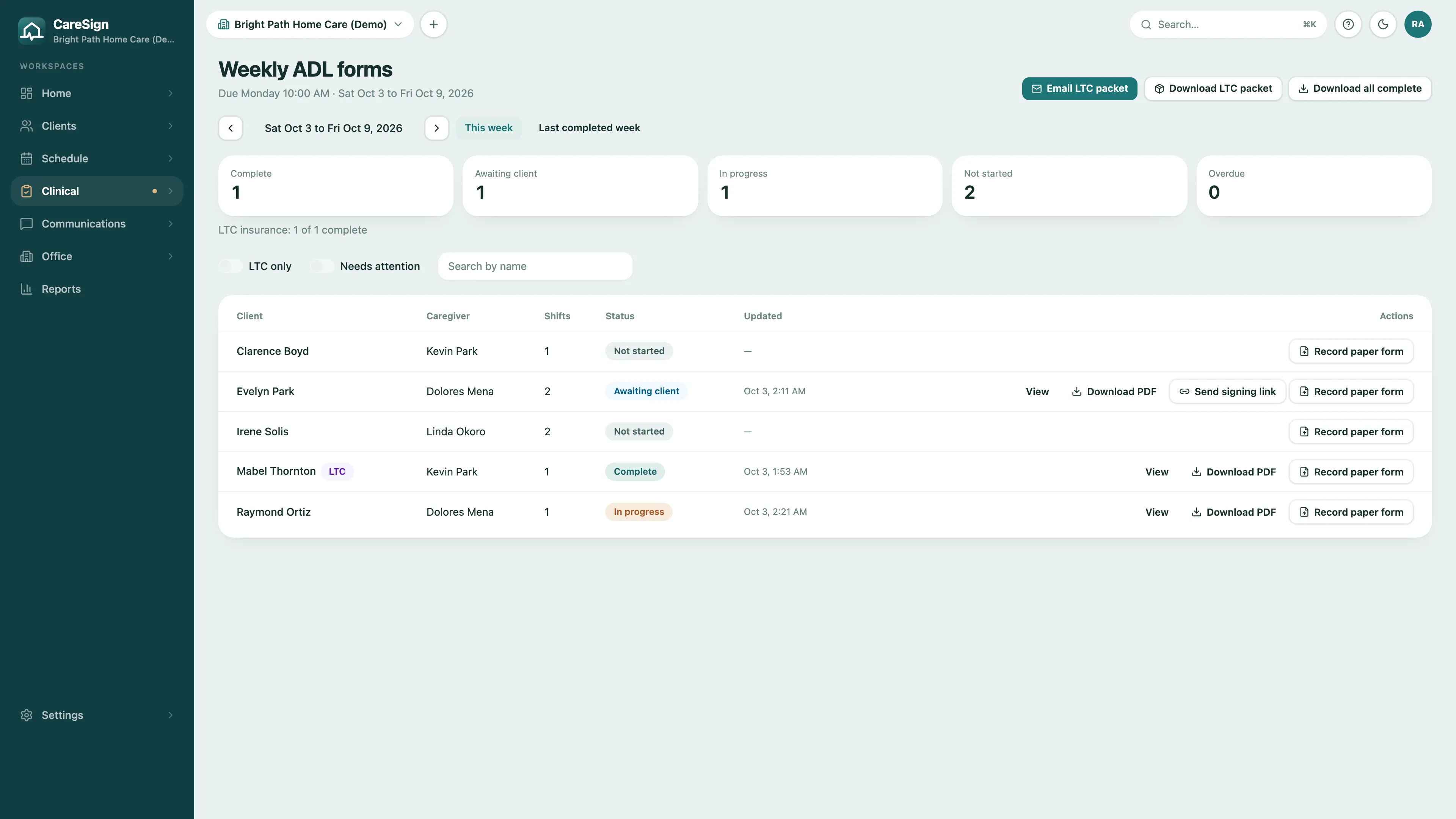
Daily services in the ADL grid, with complete, awaiting-client, and in-progress records on one board.
Keep the office moving
Client agreements, signature status, documentation gaps, agency-policy reminders, and forms QA.
A caregiver's week
From the shift to the invoice, in one place.
Private duty runs on hours: who worked, how long, what they did, and whether the client signed for it. CareSign keeps each of those on the record, in the words your agency uses: clients and caregivers.
- 1
Schedule the shift
Shifts default to four hours, an overnight shift stays one visit, and a caregiver with an expired HCA registration cannot be booked.
- 2
Work the shift
The caregiver clocks in at the client's home, checks off the shift's tasks, and clocks out, with location verified at both ends.
- 3
Sign the week
At the end of the week the caregiver signs the ADL / Service form and the client signs too, in person or through a link.
- 4
Pay and invoice
Only shifts whose paperwork holds up become payable. The same lines turn into private-pay invoices for each client.
Shifts
Hours-long shifts, scheduled like shifts.
Build the week by caregiver or by client. Overnight shifts stay one shift, and payroll splits the hours at midnight the way your settings say.
- Shifts default to four hours; recurring shifts set once and filled forward
- An overnight shift is one visit that keeps its start date; the caregiver clocks out after midnight from the same stop
- An expired HCA registration blocks booking that caregiver
- GPS clock-in and clock-out at the client's home, with exceptions flagged
The weekly ADL / Service form
The form the insurer asks for, signed every week.
Every caregiver and client pair gets a weekly ADL / Service form on the phone. The office sees which weeks are complete, which are waiting on the client, and which are overdue.
- The caregiver taps each service on each day; shift task check-offs fill in ahead of time
- The client or their legal representative signs on the caregiver's phone
- Client not there? A secure link good for 7 days, by email, QR code, or text
- An office board with Not started, In progress, Awaiting client, Complete, and Overdue
- Long-term care insurance clients: one merged PDF packet per insurer, emailed from CareSign
- Your own rows, a paper form recorded with a photo, and reminders to caregivers
Supervision and readiness
Know which clients are covered, every day.
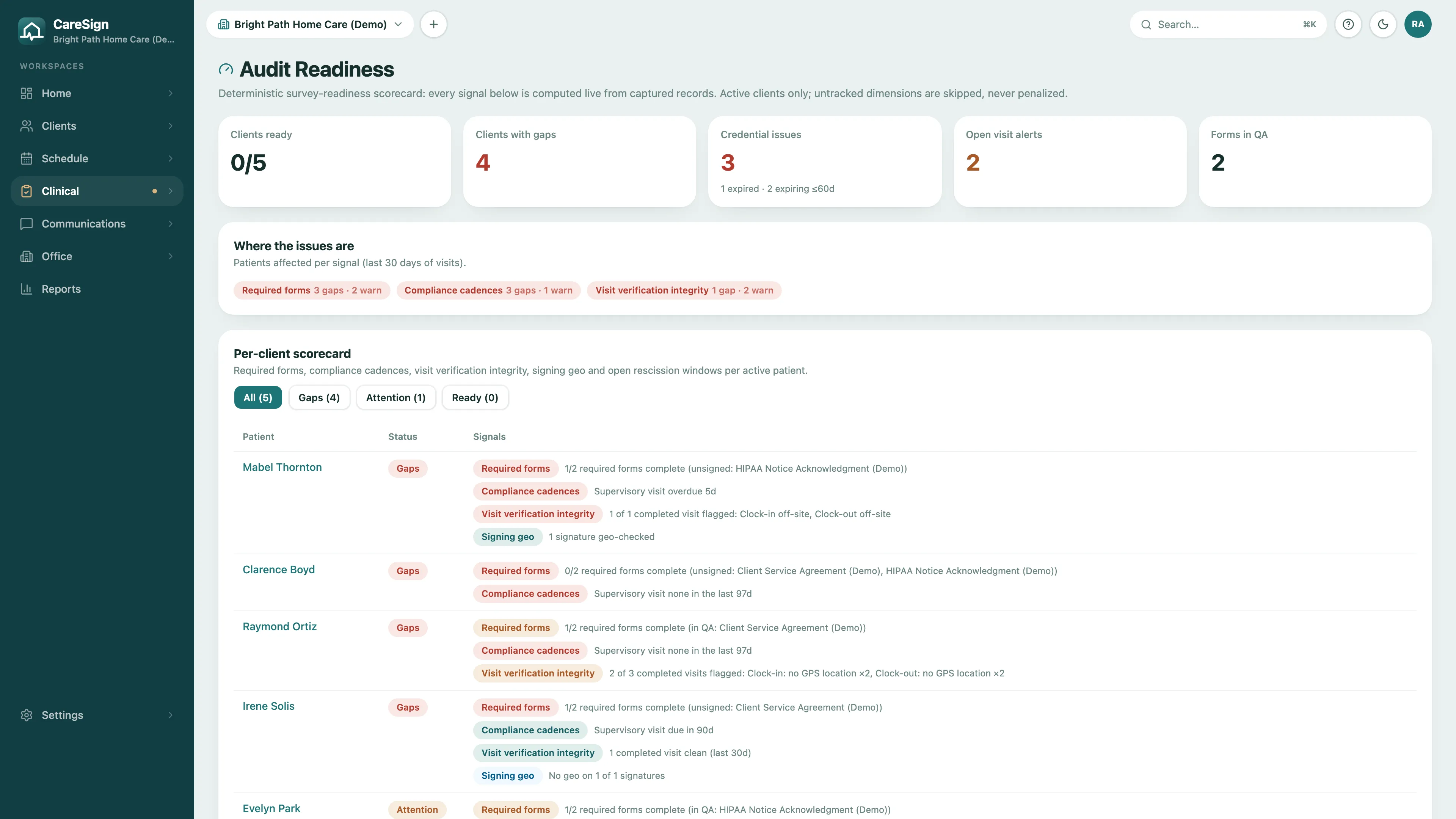
A readiness scorecard for every active client, computed from what is actually on record: signed agreements, supervisory visits, and whether each shift's location checked out.
- Required forms per client, such as the service agreement, with what is still unsigned
- A supervisory visit every 90 days to start, proven by a completed visit; change the interval to match your policy
- Shifts whose clock-in or clock-out was off-site flagged for review
- Caregiver credentials that are expired or expiring within 60 days
Payroll and private-pay invoices
Pay for shifts that hold up. Bill for them too.
A completed shift becomes payable only when its paperwork holds up: a clock-out exists and the forms on the visit are signed. Anything else waits in an exceptions queue that clears itself once the signature lands.
- Client invoices. The same payable lines become one draft invoice per client per pay period, with a bill rate beside each pay rate and per-client overrides.
- Sent from CareSign. Generate the PDF, email it to the client's billing contact, and mark it paid or void.
- Overnight and overtime. Hours past midnight count where your settings say, and hourly staff past the daily or weekly threshold get an overtime line.
The rest of the office
Fewer spreadsheets, fewer phone calls.
Client service agreements
Your own service agreement, consents, and care plan forms, signed by the client or their representative with real signature capture.
Care plans and task lists
Care plans for personal assistance, homemaking, and other services become the task list for each shift, with refused tasks and their reasons on the client's record and a binder PDF for the home.
Messages and requests
Secure messages between caregivers and the office, tagged to the client, and information requests the office can answer and track.
Mileage
Miles between shift stops computed from actual driving routes and exported for reimbursement.
Caregiver credentials
HCA registration, certifications, and immunizations on each caregiver's record, with expirations flagged before they lapse.
Payroll and QuickBooks
Hourly or per-visit pay, an overtime policy for hourly staff, per-client rate overrides, a closed pay period, and a QuickBooks CSV.
Records that answer questions
When a client, a family, or an insurer asks, show them.
Was the caregiver there, for how long, and who signed for the week? CareSign answers in the record itself.
Times you can trace
Shift clock-in, clock-out and signing times are captured when they happen. If the office has to enter or fix a clock time, the shift shows who did it, when and why, and the change lands in the audit trail.
GPS-verified shifts
Location is captured at clock-in, clock-out, and the moment of signing. The record shows the shift happened where it happened.
SHA-256-sealed signatures
Every completed signature is fingerprinted with SHA-256 and issued a verification code. Anyone you authorize can confirm authenticity without an account.
A complete audit trail
Every change to every record lands in an append-only, server-side log: who, what, when, and which fields changed. Not even agency admins can edit it.
See private duty in CareSign
Book a demo and we'll walk through a private duty demo agency with you, focused on the parts your team asks about.