Mobile wound care
Run your wound practice on CareSign.
The weekly rounds across homes, ALFs, and SNFs, the consents, progress reports back to your referrers, a progress note built for wound care, and the proof that every visit really happened. Built to be the chart of record for a mobile wound practice.
See it end to end
One wound visit, from the doorstep to the office's next action.
The visit on the iPhone, the office dashboard and chart, the progress note and its PDF, and the orders, studies, handoffs, and follow-ups that stay visible until they close.
5:48. Every screen in the film is the real product, running on a demo agency. No patient information appears anywhere in it.
At the visit
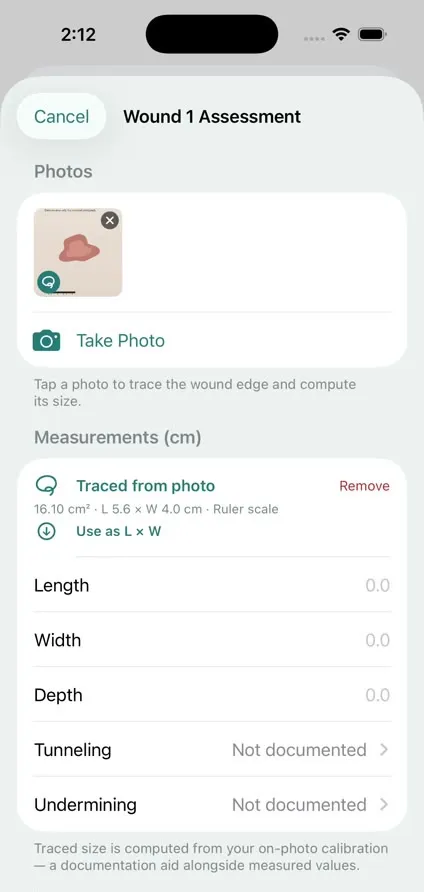
Margaret's chart on the iPhone, a wound photo taken in the app, the edge traced to compute its size, the stage and treatment recorded, then a signature with an attestation and the assessment submitted for office review.
In the office
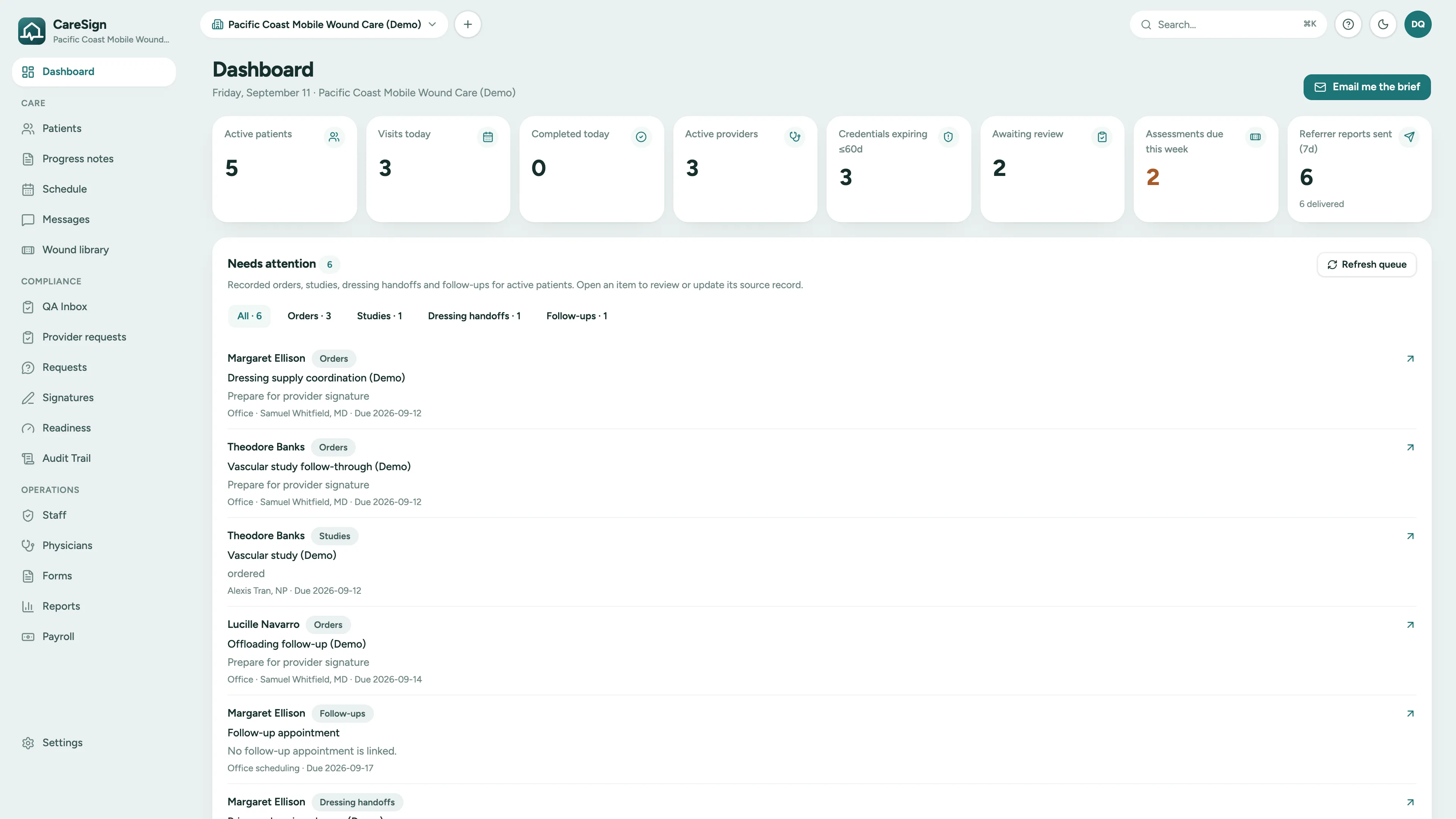
The dashboard's Needs attention queue, the week's schedule with an unbooked follow-up target, the census, and one patient's chart with two active wounds.
The progress note
A signed note opened on the web with its content verified intact, each wound's measurements, change from baseline and procedure, the same note as a PDF, and a skin substitute application with each piece's identity.
Follow-through
A dressing order waiting for a provider's signature, a vascular study with the result pending, a dressing handoff the receiving agency has not acknowledged, the follow-up target, and the QA inbox.
The patient chart
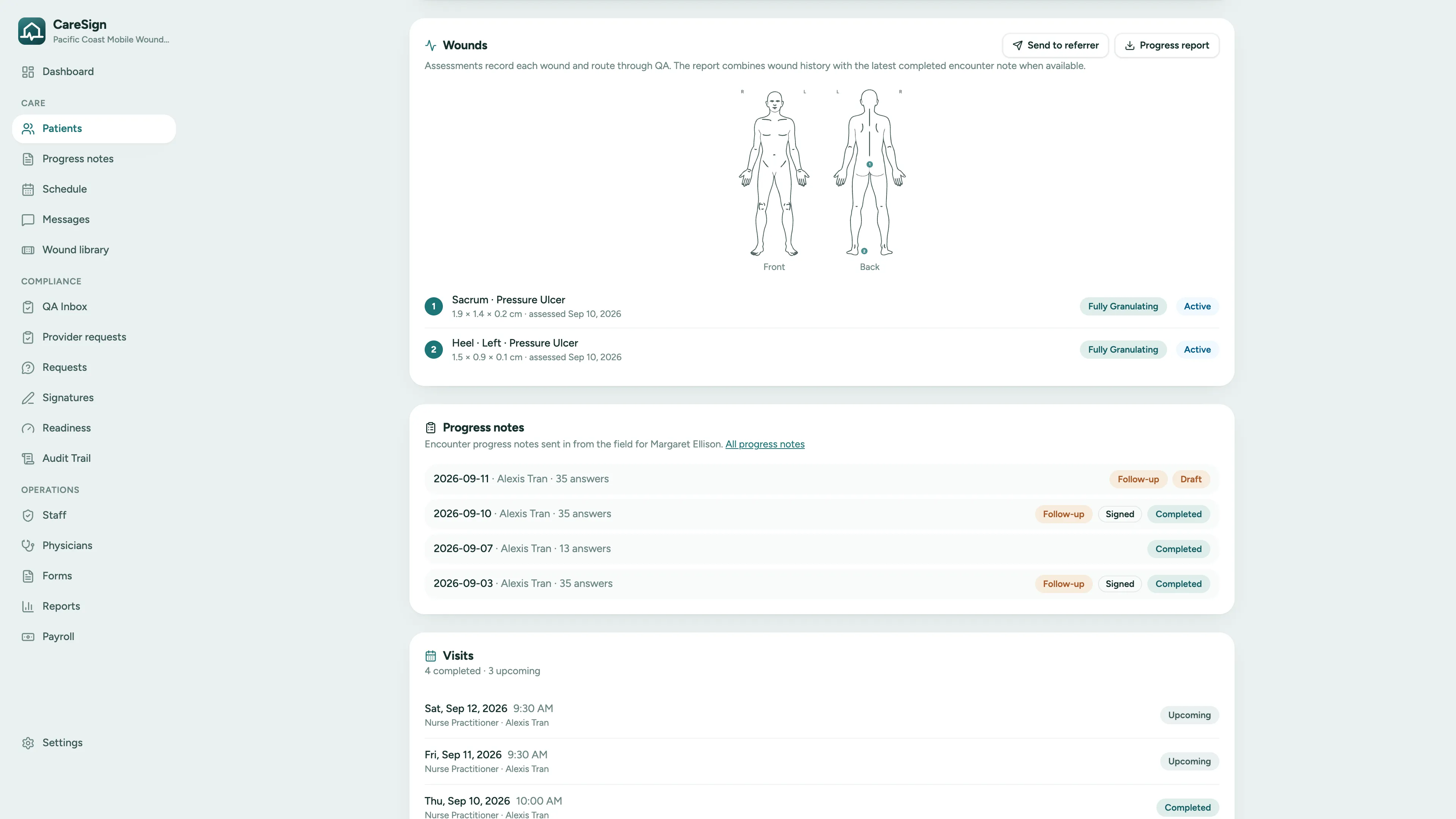
One chart per patient. One record per wound.
Each wound is its own record on the patient's chart: where it sits on the body, its dated measurements, its healing status, and every progress note written about it. The office and the field look at the same chart.
- Anatomical body chart with numbered wounds, front and back, the same on the web and on the iPhone
- Per-wound measurements, healing status, and history, dated at every assessment
- Progress notes from the field listed on the chart: drafts, signed notes, and older unsigned notes labeled as such
- Send to the referrer or export the progress report straight from the chart
The progress note
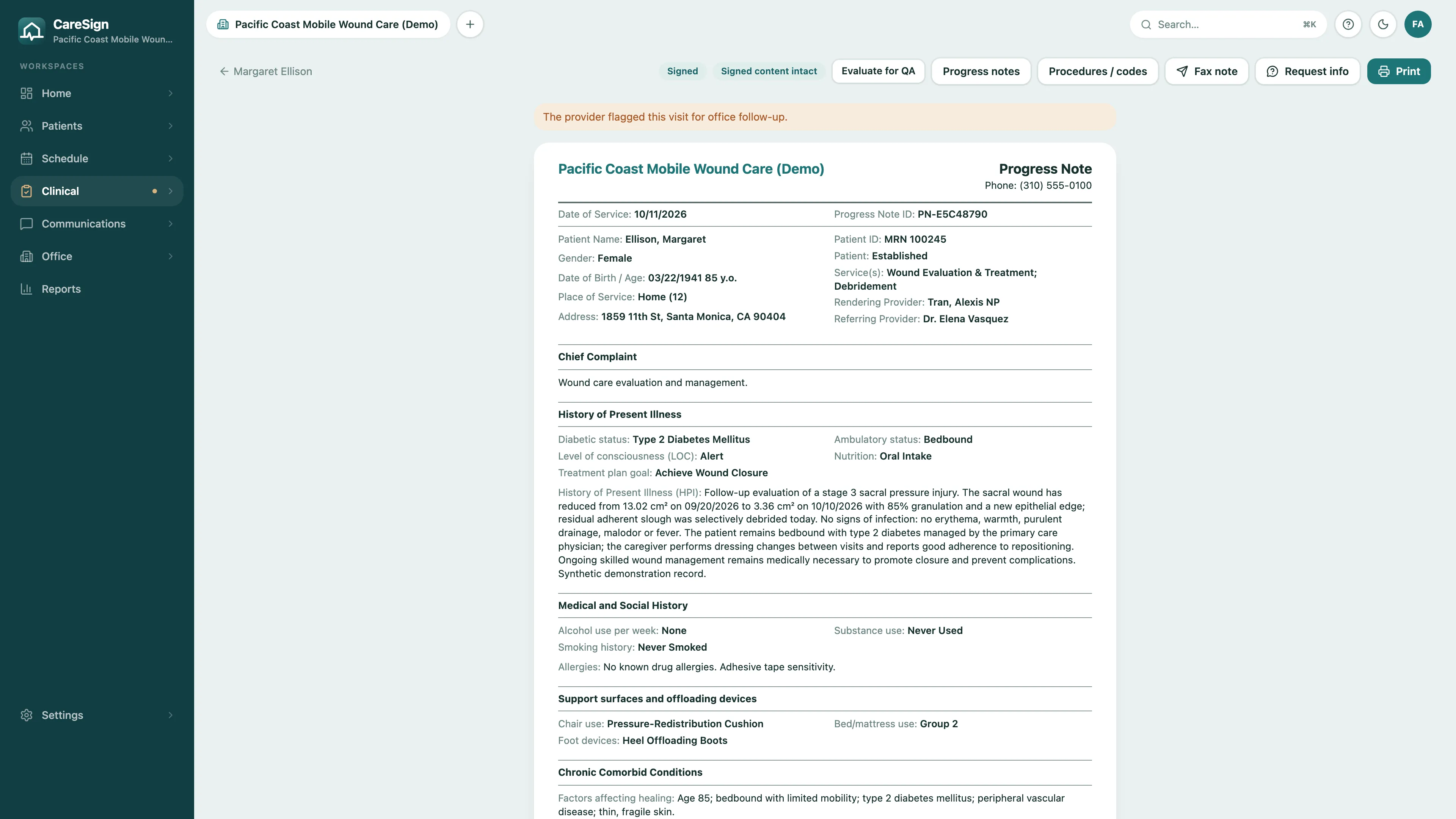
A wound note laid out for mobile wound care, on the web and as a PDF.
CareSign prints the encounter note in standard Medicare and wound care terms: letterhead, date of service, patient and rendering provider, chief complaint, history, review of systems, exam, then a section for each wound. Every date prints month, day, year.
- Each wound in one place: measurements and area change from baseline, the assessment with ICD-10 and wound bed, then the procedure performed and the product used
- Previous measurements, wound bed history, and area over time stay with each wound, then the treatment plan
- Signed notes are sealed: opening one verifies the content is intact, and corrections are explicit
- The same note exports as a PDF and goes out as the attachment on the referrer report
Scheduling for mobile teams
Same patients, every week, forty miles apart.
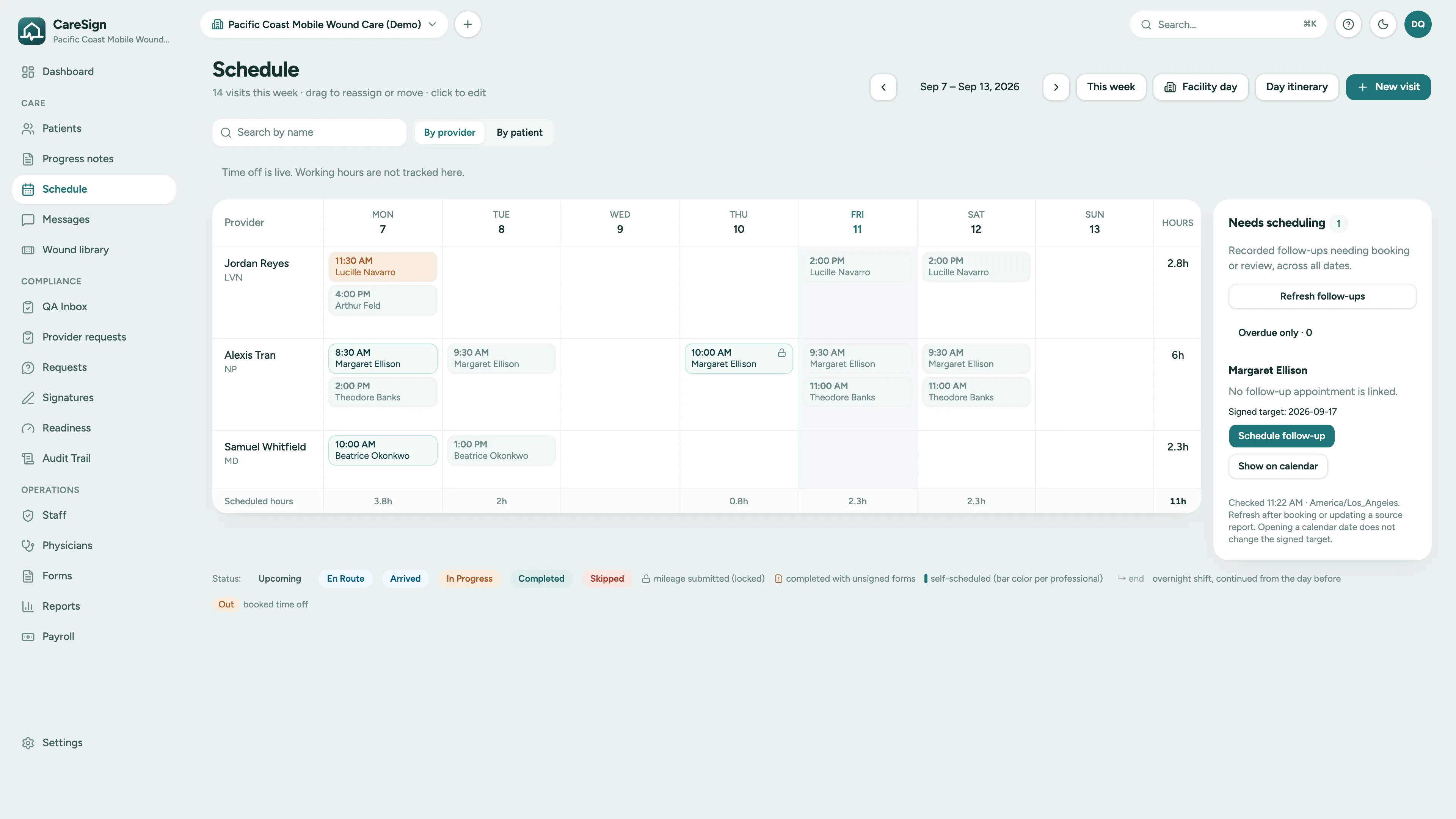
Wound care runs on rhythm: standing weekly visits scattered across three counties. CareSign schedules the rhythm once and keeps it, instead of making someone rebuild next week from this week, every week.
- Recurring visit series: set the weekly cadence once and the schedule fills itself forward
- A wound rounds card on the dashboard: the healing trend of every active wound and the assessments due this week
- Signed follow-up targets stay listed under Needs scheduling until someone books them
- Provider self-scheduling within the approved visit frequency, without office ping-pong
- Mileage tracked from actual driving routes and exported for reimbursement, built for multi-county territories
Signatures and consents
A checkbox is not a consent.
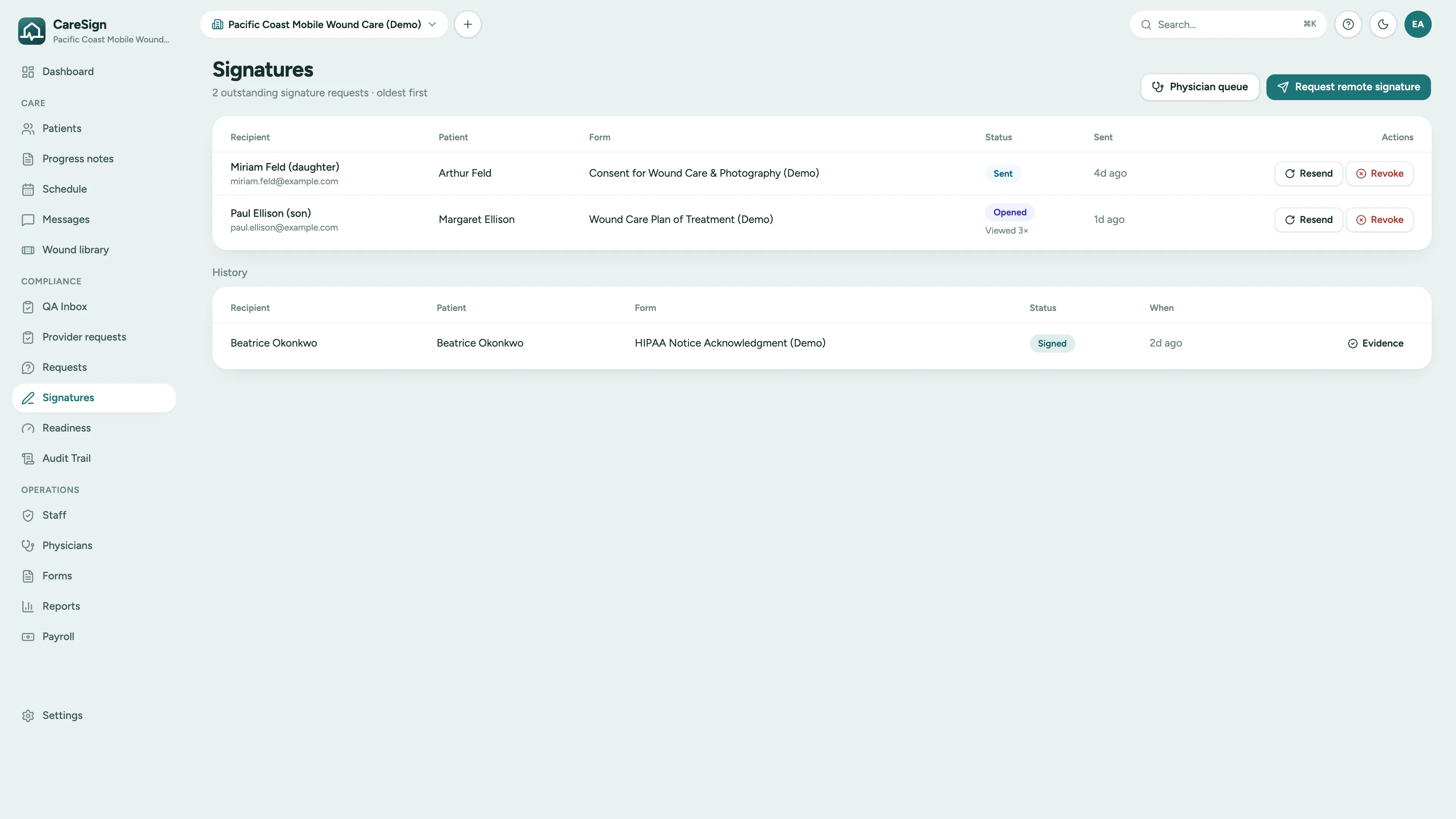
Debridement, biopsy, wound photography: procedures need consents that hold up when questioned. CareSign captures a real signature on your own consent forms, at the bedside or remotely, seals the result, and routes it to the office for review.
- Procedure and photography consents on the forms your practice already uses, with real signature capture
- Signed at the bedside on the provider's iPhone, in the flow of the visit
- Remote signing links a patient or representative can open and sign from any device
- Every completed consent sealed tamper-evident, with a verification code and certificate
- Signed consents and field wound assessments land in the office QA inbox: view, start review, approve, or return
Referrals and reporting back
Keep the 24-hour promise without the late nights.
Referrals arrive by phone, email, and e-fax, and the case managers who send them judge you on what comes back. Most practices keep that promise on willpower. CareSign keeps it on rails.
- 1
Capture the referral
The case manager who sent the patient lives on the patient record: name, role, phone, email. Six months later, when someone asks who referred Mrs. Alvarez, the answer is on the chart, not in an inbox.
- 2
Document the visit
The provider charts at the bedside, photographs the wound, and collects the signatures. By the time the car door closes, the record is complete.
- 3
Report back
The progress report goes back to the referrer as a PDF by email, with the visit note printed first, and every send is recorded in the audit trail. Follow-up for every referrer, without anyone assembling it by hand.
Referrers who hear back keep referring. The loop that wins the next patient is the same loop that documents this one.
Wound documentation in the field
Chart the wound at the wound.
Documentation reconstructed hours later from memory and a photo on a personal phone is weak documentation. CareSign puts capture at the point of care, in a native iPhone app built for the doorway and the bedside, not a web portal squeezed onto a phone screen.
Wound photos, on the chart
Photograph the wound in the app during the visit. Photos attach to the wound and the assessment, never to somebody's personal camera roll.
Trace to measure
Calibrate on a reference in the frame, trace the wound edge, and the app computes area, length, and width. A documentation aid beside the measured values.
Staged and signed on the device
Pressure stage and treatment performed come from the wound vocabulary. The clinician signs with an attestation, the assessment is sealed on submit, and it waits for office review.
Healing trajectory
Measurements plot over time into a trajectory per wound. Progress, stalls, and deterioration are visible at a glance, and documented when they matter.
Orders and follow-through
What was recorded and not yet closed, on the front page.
Orders, studies, dressing handoffs, and follow-ups each name an owner and a due date, and each stays on the dashboard until it closes. Open any item to reach the record that owns it.
- Clinical orders drafted in the office, frozen as a PDF, and signed by the provider through the physician queue
- Studies ordered with a named clinician responsible, the result attached when it arrives, and a separate clinical review
- Dressing handoffs split between the practice and the receiving agency, with the agency's acknowledgment status visible
- Wound assessments from the field wait in the QA inbox for review, approval, or return
- Secure in-app messages from the field to the office, tagged to the patient
Audit-defensible records
When the records request comes, be boring.
Medicare scrutiny of wound care documentation is rising. The practices that come through reviews quietly are the ones whose records answer questions before anyone asks them.
Times you can trace
Clock-in, clock-out and signing times are captured when they happen. If the office has to enter or fix a clock time, the visit shows who did it, when and why, and the change lands in the audit trail.
GPS-verified visits
Location is captured at clock-in, clock-out, and the moment of signing. The chart shows the visit happened where it happened.
SHA-256-sealed signatures
Every completed signature is fingerprinted with SHA-256 and issued a verification code. Anyone you authorize can confirm authenticity without an account.
A complete audit trail
Every change to every record lands in an append-only, server-side log: who, what, when, and which fields changed. Not even agency admins can edit it.
CareSign runs on HIPAA-ready infrastructure under Business Associate Agreements, and every record exports as a PDF, so the chart is yours to hand to a surveyor, a referrer, or an auditor on demand.
See a wound visit in CareSign
Book a demo and we'll walk through a wound care demo practice with you, focused on the parts your team asks about.