Product
From the doorbell to the audit binder.
CareSign follows the visit end to end: the nurse's iPhone captures what happened, the portal turns it into defensible records, and the office stays survey-ready without heroics.
Signing
Four ways to get a defensible signature
However the signature happens, the evidence is the same: a verification code, a certificate, a tamper-evident fingerprint, and a record of who signed, in what capacity, where, and when.
At the bedside
The nurse hands over the iPhone. Patients sign in place on the form, with capacity attestation and a full attestation page, and GPS marks where it happened.
Signature-in-60-Seconds
No email address handy? The app shows a QR code; the patient or caregiver scans it with their own phone and signs immediately. The link dies when it's used.
By secure link
Send a single-use signing link by email. It expires automatically, caps failed attempts, and can be resent or revoked from the portal at any time.
The Physician Order Queue
Stop chasing MDs order by order. Build a stack of plans and orders, send the physician one link, and they sign the whole queue in one sitting.
Multi-signer forms route across up to six disciplines. Voluntary arbitration agreements are supported as a distinct workflow, including rescission handling. If a form gets signed in person while a link is outstanding, the link is automatically superseded. No duplicate records.
Forms engine
Bring your own forms.
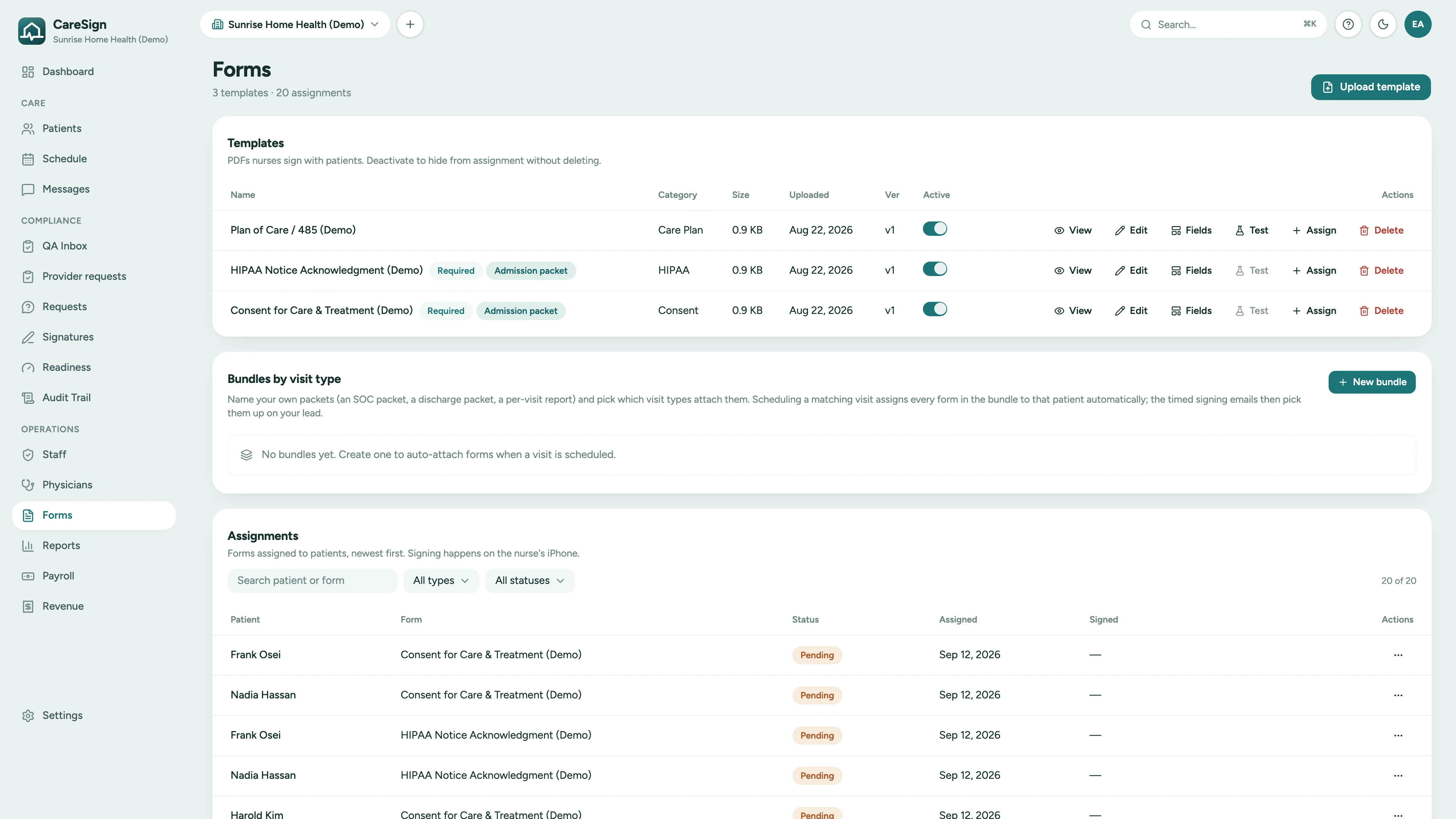
Upload the forms your agency already uses and place the fields once. From then on, patient, episode, and visit data land in the right places on the iPhone and on the web, and every signed copy is an immutable snapshot.
- Drag-and-drop field placement on your actual PDFs
- One-click import of existing fillable-PDF (AcroForm) fields
- Canonical auto-fill: patient, episode, and visit data land in the right fields on both iPhone and web
- Versioning with immutable snapshots: the form a patient signed never changes under them
QA review
Nothing reaches the chart unreviewed.
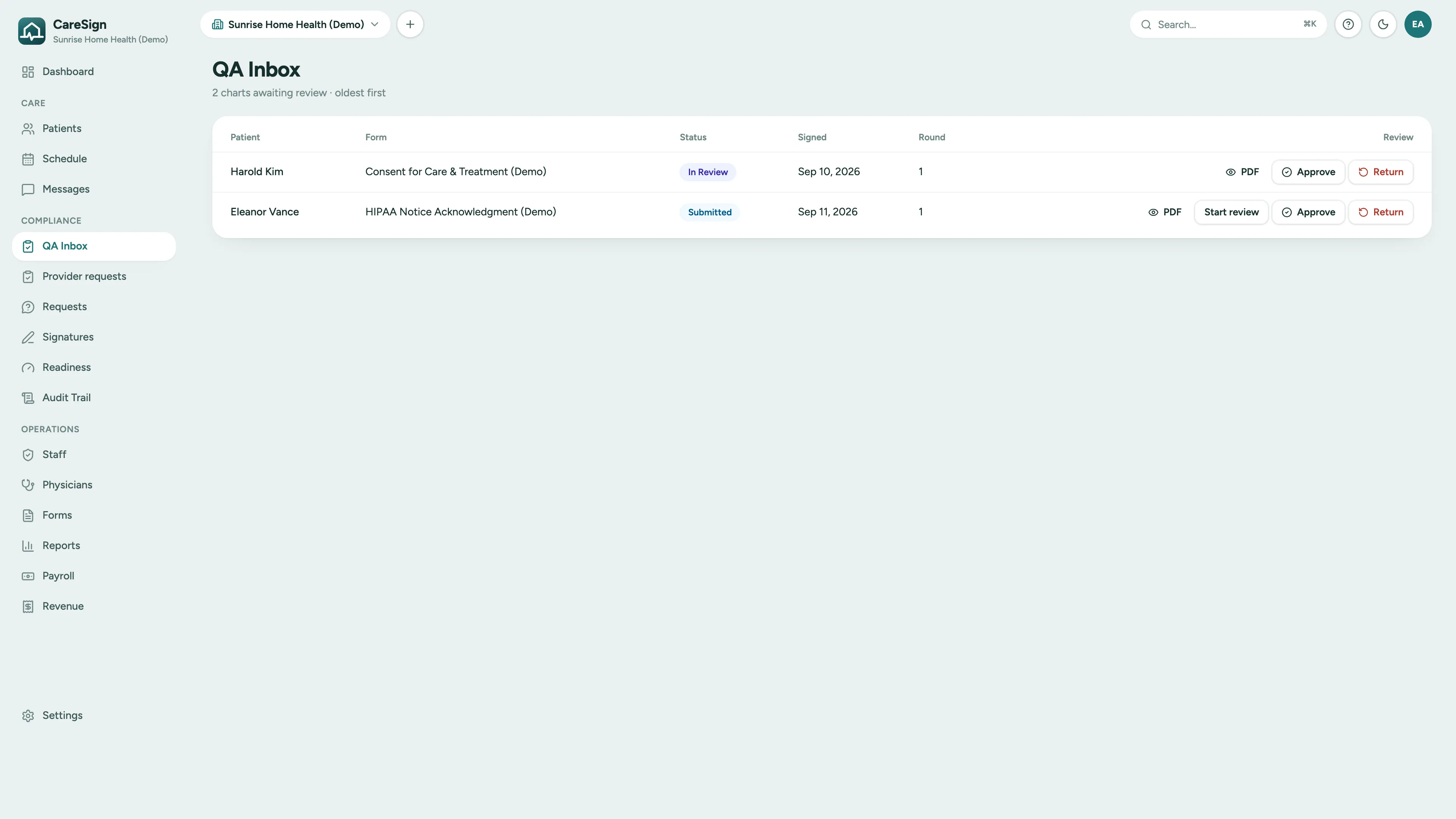
Submitted documents land in a QA inbox, not directly in the record. Reviewers approve, or return for re-signature with a reason the nurse sees immediately. Status history is tracked at every step.
- QA inbox with reviewer assignment and status gates
- Return-for-resignature with reasons, not phone tag
- Signature aging view: see every outstanding link and its expiry at a glance
- Every transition recorded in the audit trail
Proof of service
GPS-verified evidence on every visit.
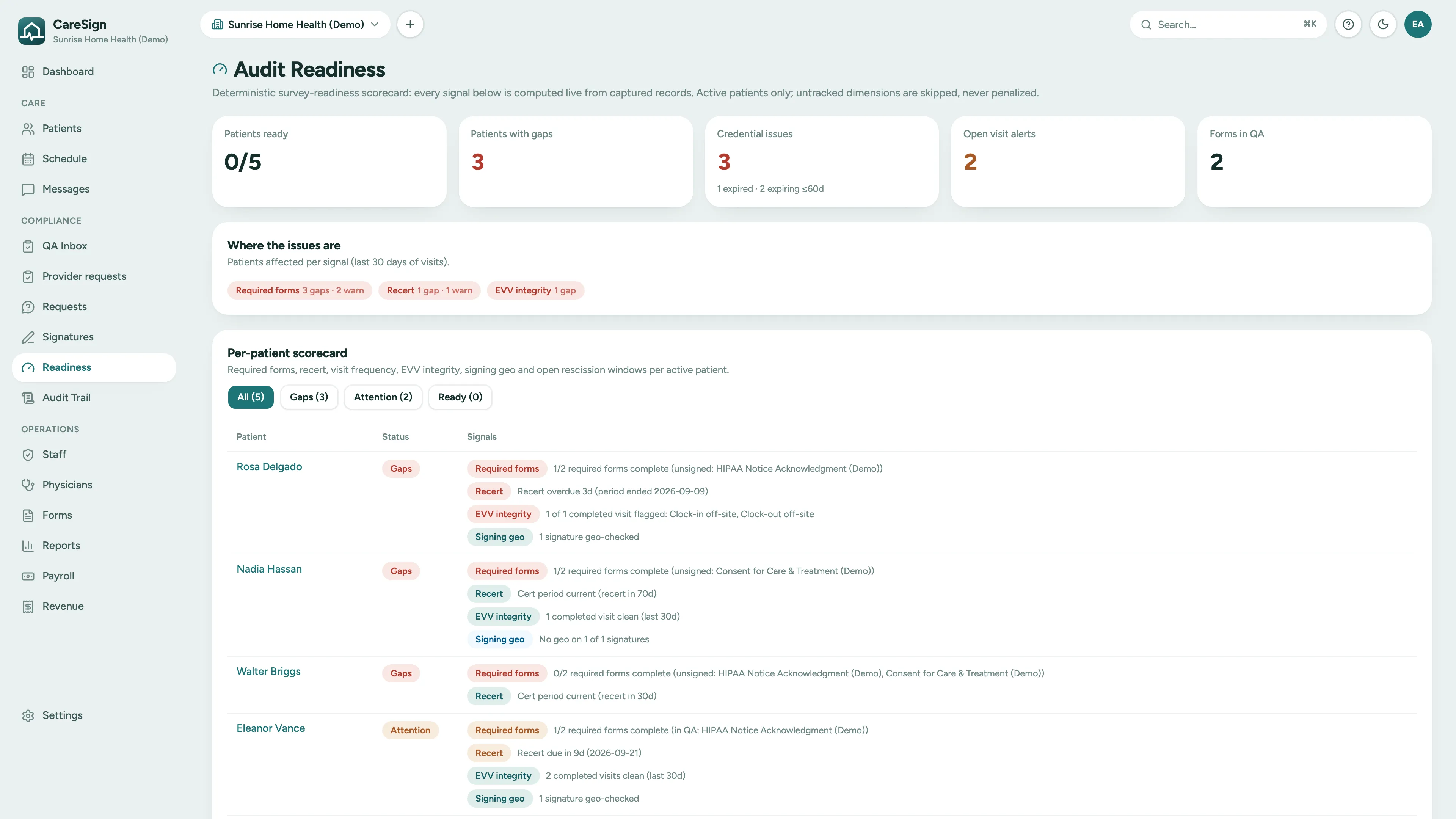
GPS is captured at clock-in, clock-out, and at the moment of signing. Revenue-integrity checks flag visits whose evidence looks thin before they become billing problems. And when anyone asks, a proof-of-service packet bundles the whole story in one document. CareSign captures the visit data EVV programs ask for; it does not submit to a state EVV aggregator.
- Geo-stamps at clock-in, clock-out, and signing
- Revenue-integrity flags on visits with weak evidence
- Proof-of-service packets: visit, signatures, geo, and audit trail in one bundle
- Readiness scorecard ties it together across the agency
The patient chart
One chart, with the sources in view.
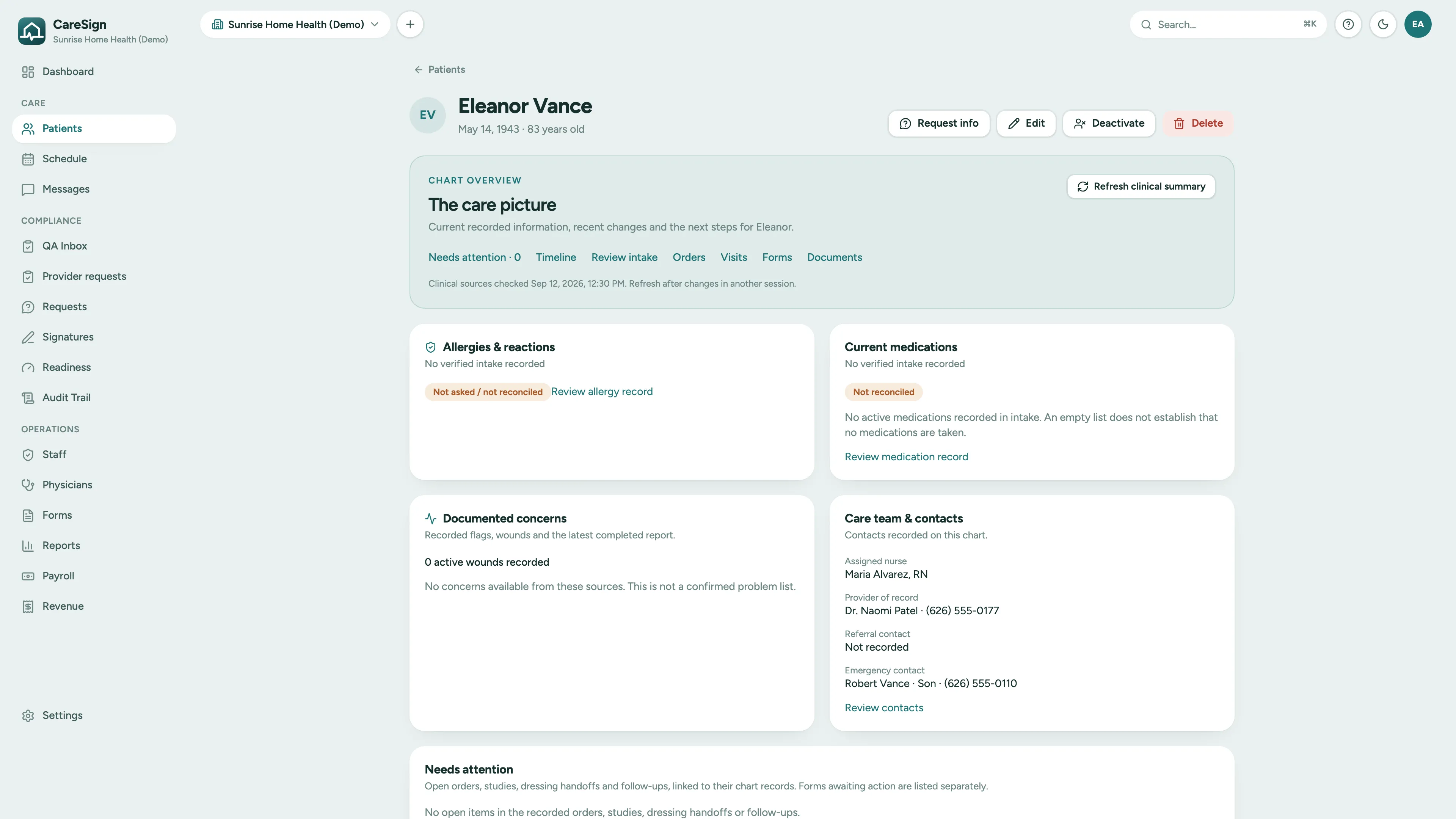
Every patient has one chart: the care picture up top with verified intake medications and allergies, documented concerns, and the care team, then the timeline, orders, visits, forms, and documents underneath. Each figure shows which source it came from and when that source was last checked.
- Verified intake medications and allergies, with the reconciliation status in plain sight
- Needs attention on the chart: open orders, studies, handoffs, and follow-ups for this patient
- Timeline of everything recorded, searchable
- Records are inactivated, not deleted, and every change lands in the audit trail
And the rest of the day job
Everything an agency runs on, one login
Clinical orders
Draft an order in the office, freeze it as a PDF, route it to the provider for signature, and have the assigned clinician acknowledge it on the iPhone. Studies and results attach to the order.
Scheduler board
Recurring visit series, self-scheduling within the approved frequency, overnight shifts that cross midnight, and staff time off that blocks the calendar. Under- and over-delivery show up before the claim does.
Shift task lists and ADL logs
Care tasks checked off on the visit, and for private duty a weekly ADL log the client or family signs remotely, ready to send as an LTC packet.
Info requests
The office asks the field for what a chart is missing, in typed items. Answers come back from the phone and merge into the visit report.
Credential tracking
Licenses and certifications per clinician with expiry warnings, and assignment guards when a credential lapses.
Visit alerts
Late and missed visits flagged every 10 minutes, with a morning digest summarizing yesterday's misses and today's risks.
Mileage & payroll exports
Route-calculated daily mileage frozen on submit, plus CSV exports shaped for payroll and reimbursement at the IRS rate.
Team messaging
Secure in-app messaging between the office and the field. Questions about a visit stay attached to the work, not in personal texts.
Reports
Visit completion, credential expirations, recert pipeline, and signature aging: the numbers a DON actually checks.
Audit log viewer
Search the immutable server-side trail by record, action, or date, and see field-level diffs for every change.
Four agency types
Presets for home health, hospice, private duty, and mobile wound care set the vocabulary, visit types, starter forms, and modules. Turn off what your agency does not do.
Wound care
Wound photos that stay in the chart, trace-to-measure, healing trajectories, rounds, referrer reporting, and a progress note built for wound care.
See the wound care pageNothing is locked in: every record exports in a form built to be consumed elsewhere, as payroll CSV, mileage CSV, PDF packets, and evidence packets.
Want to see it for your agency?
Book a demo and we'll walk through a demo agency with you, focused on the parts your team asks about.